Connect Klaviyo
Send every occasion to your shoppers’ Klaviyo profiles, then remind those shoppers with your own Klaviyo flows, your own design and your own sender.
Klaviyo is available on the Growth and Pro plans. See Plans & billing.
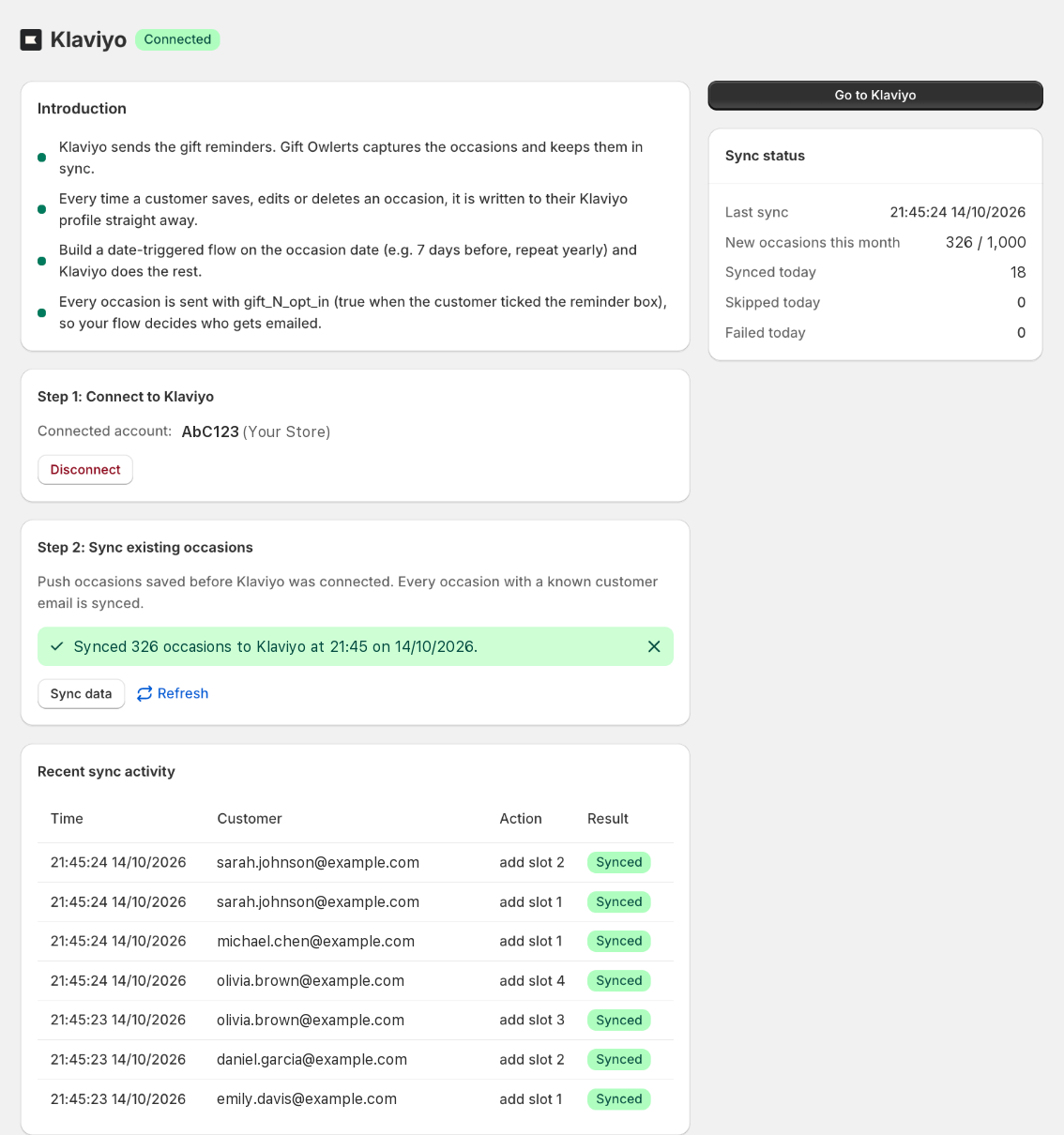
Connect your account
- Open the Klaviyo pageClick Klaviyo in the app menu.
- Click Connect KlaviyoKlaviyo opens and asks you to approve Gift Owlerts. It can only read your account name and update your shoppers’ profiles.
- ApproveYou’re brought back to the app and the badge changes to Connected, with your account name.
The connection link is valid for 10 minutes. If it expires, just click Connect Klaviyo again.
Sync your existing occasions
New occasions are sent to Klaviyo automatically. To send occasions saved before you connected, click Sync data under Sync existing occasions. Every occasion with a known shopper email is synced. Click Refresh to see progress.
The Recent sync activity table shows each update with a result: Synced, Skipped or Failed. The sidebar shows your Sync status for today and this month.
What’s added to Klaviyo profiles
Each shopper’s profile can hold up to 5 occasions, in slots numbered 1 to 5. Each slot adds these profile properties:
| Property | Example |
|---|---|
gift_1_date | 2026-03-12 (YYYY-MM-DD) |
gift_1_name | Sarah |
gift_1_relationship | Sister |
gift_1_occasion | Birthday |
gift_1_opt_in | true or false |
Slots 2 to 5 use the same names with gift_2_, gift_3_ and so on.
- Every occasion is sent, whether or not the shopper ticked the opt-in box. Use
gift_N_opt_into filter your flows. - The Klaviyo profile is the shopper’s order or account email. Occasions saved on the cart are sent once the order is placed.
- If a shopper already has 5 occasions, a 6th is skipped (shown as Skipped in the activity table).
- Edits, deletes and stopped reminders update Klaviyo too.
Next step: build your Klaviyo reminder flow. Occasions sent to Klaviyo are no longer emailed by Gift Owlerts, so your flow takes over.
Disconnect
Click Disconnect on the Klaviyo page. Gift Owlerts removes all gift_ properties from your shoppers’ Klaviyo profiles, then ends the connection. Gift Owlerts will start sending reminder emails again.
Planning to uninstall? Disconnect Klaviyo first. Uninstalling does not clean up Klaviyo profiles.
If the connection is lost
If Klaviyo access is revoked or expires, you’ll see Klaviyo connection lost. Click Reconnect Klaviyo and approve again.