Build your Klaviyo reminder flow
Klaviyo’s date-triggered flows read the gift_N_date properties that Gift Owlerts adds to each profile. One flow per slot sends a reminder before every occasion, every year.
Before you start, connect Klaviyo and sync your occasions, so at least one profile has a gift_1_date property.
Create the flow for slot 1
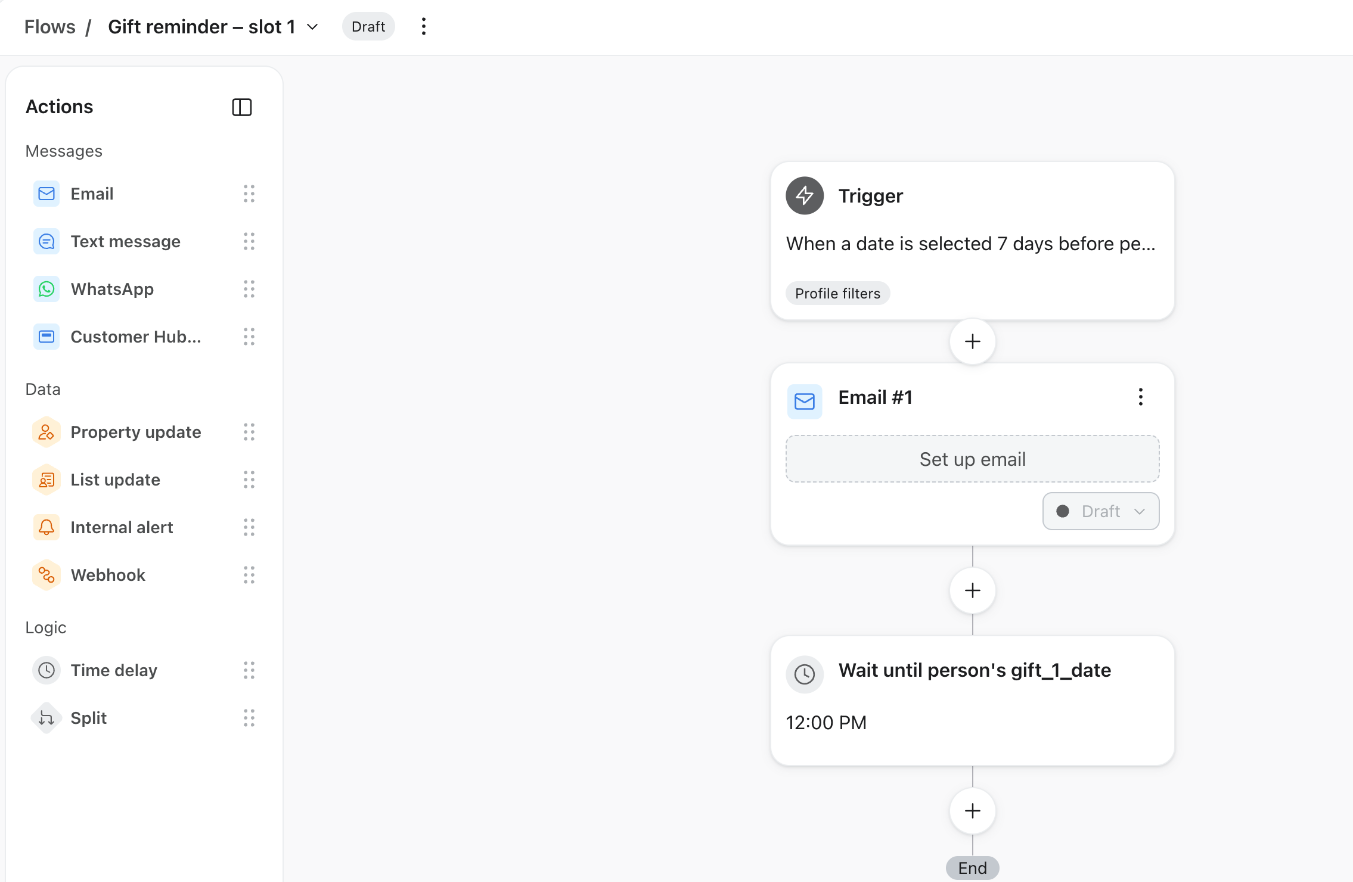
- Create a flowIn Klaviyo, go to Flows → Create flow → Build your own. Name it something like “Gift reminder – slot 1”.
- Set the triggerChoose Date property and select
gift_1_date. Set it to send 7 days before (or whatever suits your shipping times) and repeat Yearly. - Add the opt-in filterClick the trigger, then under Profile filters choose Properties about someone →
gift_1_opt_in→ is true (type Boolean). Without it, shoppers who didn’t tick the box still get the email. - Add your email above the Wait stepKlaviyo adds a Wait until gift_1_date step automatically. Place your email above it (see the warning below).
- Turn off Smart SendingIn the email’s settings, switch off Smart Sending so reminders aren’t skipped because the shopper got another email from you recently.
- Test, then go liveSend a test to yourself, check the details render, then set the flow to Live.
An email placed below the Wait until gift_1_date step is sent on the day of the occasion, which is too late to buy a gift. Put the email above the Wait step so it goes out the number of days before that you set in the trigger.
Also check the trigger’s time unit: it can default to Weeks instead of Days.
Personalise the email
Use these variables in your Klaviyo email to show the occasion details for slot 1:
| Shows | Variable |
|---|---|
| Recipient’s name | {{ person|lookup:'gift_1_name' }} |
| Occasion | {{ person|lookup:'gift_1_occasion' }} |
| Relationship | {{ person|lookup:'gift_1_relationship' }} |
| Date | {{ person|lookup:'gift_1_date' }} |
For example: “{{ person|lookup:'gift_1_name' }}’s {{ person|lookup:'gift_1_occasion' }} is coming up!” becomes “Benny’s Pet Birthday is coming up!”
Repeat for slots 2 to 5
A shopper can have up to 5 occasions, so create the same flow four more times. The quickest way is to clone the slot 1 flow and change every gift_1_ to gift_2_, gift_3_ and so on: in the trigger, the filter and the email variables.
Most shoppers save one or two occasions. If you’re just starting, slots 1 and 2 cover most people; add the rest when you’re ready.