Add the gift form to your store
The gift form is where shoppers save their occasions. Add it to your cart page (or product page) with the Shopify theme editor. No code needed.
Add the app block
- Open the theme editorIn Shopify admin, go to Online Store → Themes and click Customize on your live theme.
- Go to your cart pageUse the page selector at the top to open Cart. If your theme uses a cart drawer instead of a cart page, open a Product page instead (see the note below).
- Add the blockClick Add block (or Add section), open the Apps tab and choose gift-owlerts.
- Match your brandSet Button colour and Button text colour in the block settings.
- SaveClick Save, then check the page on your store.
App blocks can’t be added inside a theme’s cart drawer. If your store only has a drawer, add the form to your product page instead.
Gift Owlerts has no App embed to switch on. If you don't see it under App embeds in the theme editor, that's expected: the gift-owlerts block is all you need.
What shoppers see
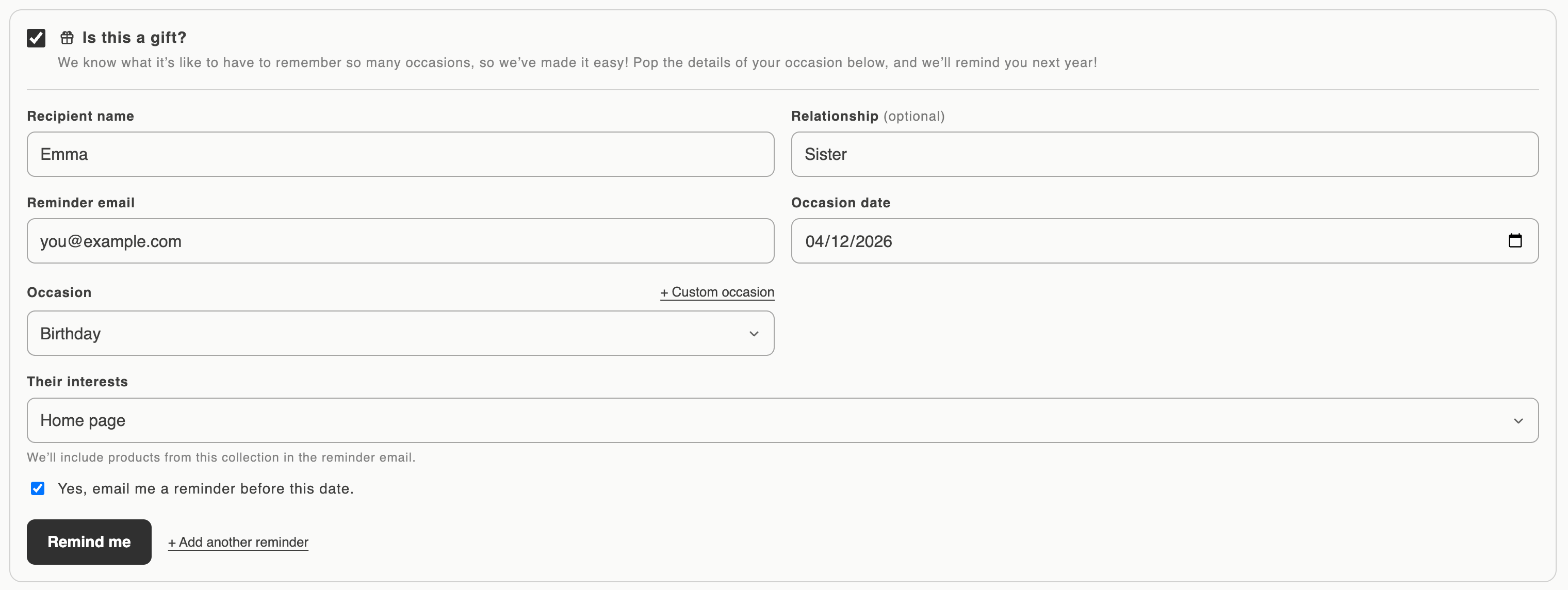
The form starts with a single checkbox, Is this a gift?. When the shopper ticks it, these fields appear:
| Field | Notes |
|---|---|
| Recipient name | Who the gift is for. |
| Relationship (optional) | For example Mother, Partner or Friend. |
| Reminder email | Where the reminder should be sent. |
| Occasion date | Any date, including past years (for example a birth date). Reminders repeat every year on that day and month. |
| Occasion | The occasions you’ve switched on. On Growth and Pro, shoppers can also click + Custom occasion to name their own. |
| Their interests | A collection from your store. Products from it are shown in the reminder email. |
| Opt-in checkbox | Yes, email me a reminder before this date. Optional. Its value is shared with Klaviyo as gift_N_opt_in. |
The shopper clicks Remind me and sees Your reminder has been saved. They can click + Add another reminder to save more occasions; there’s no limit.
How the occasion is linked to the shopper
Shoppers don’t need to be logged in to save an occasion. When they place their order, Gift Owlerts links the occasion to the shopper’s name and email. Until then it appears in Contacts with the customer name Unavailable.