Dashboard & revenue
The Dashboard is the first page you see when you open Gift Owlerts. It shows how many occasions you’re collecting and how much revenue reminders bring back.
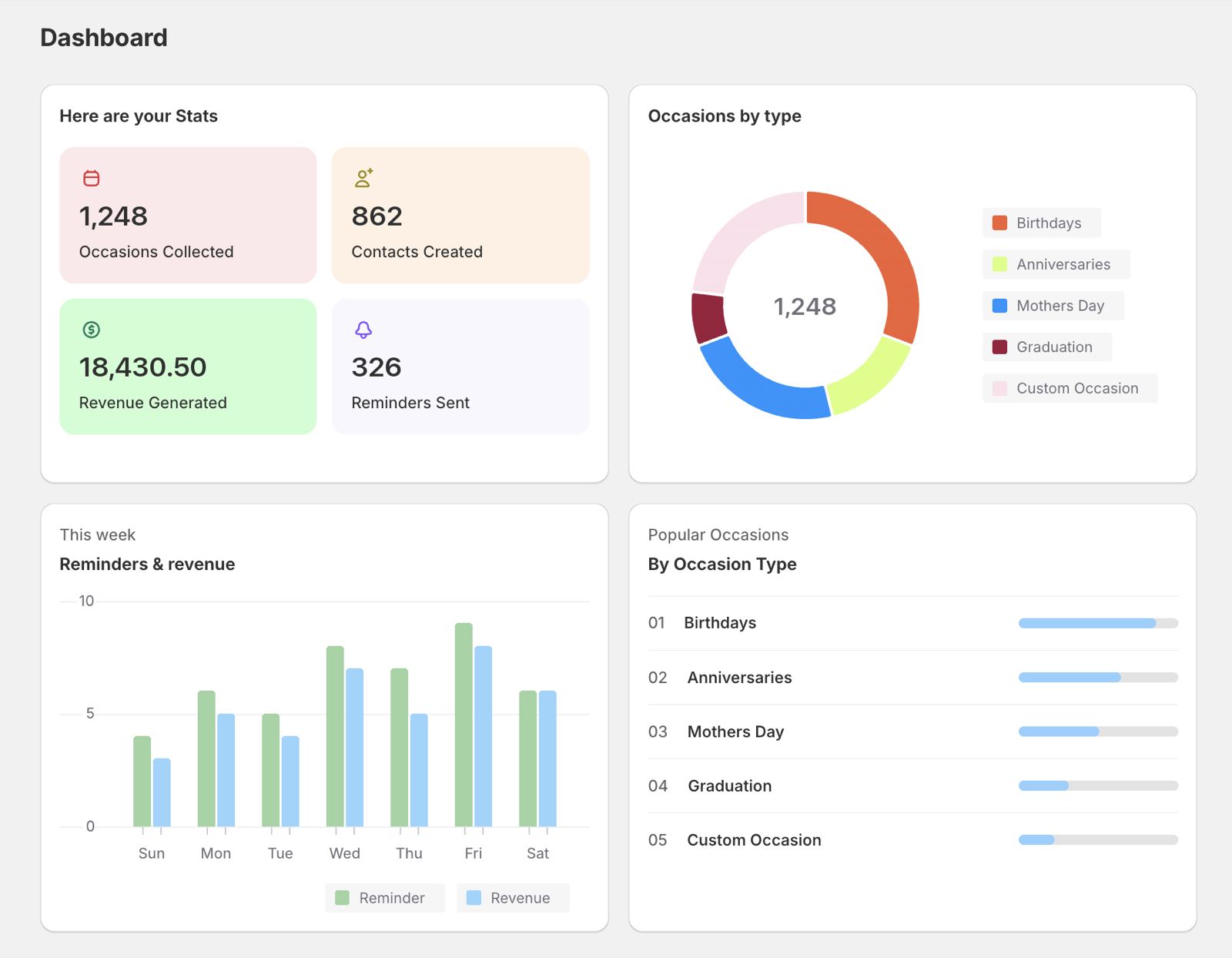
Your stats
| Tile | What it counts |
|---|---|
| Occasions Collected | All occasions saved by shoppers. |
| Contacts Created | Distinct reminder email addresses. |
| Revenue Generated | Order subtotals from orders that started from a Gift Owlerts reminder email. |
| Reminders Sent | Reminder emails sent by Gift Owlerts. Emails sent by your Klaviyo flows aren’t included. |
Charts
- Occasions by type: Birthdays, Anniversaries, Mothers Day, Graduation and custom occasions.
- This week: reminders and revenue from Sunday to Saturday (UTC).
- Popular Occasions: which occasion types shoppers choose most.
How revenue is attributed
Each product in a reminder email has an Add to cart link. When a shopper uses it and places an order, the order’s subtotal is added to Revenue Generated. Each order is counted once.
Orders from Klaviyo flow emails aren’t tracked here. Use Klaviyo’s own flow analytics for those.